Schedule LinkedIn Posts with Postger
Plan, write, and auto-publish LinkedIn posts from a visual content calendar. Schedule carousels, articles, and text posts for personal profiles and company pages, with team approvals built in.
Why schedule LinkedIn posts?
LinkedIn's algorithm rewards consistency. Profiles and company pages that post regularly see higher engagement rates, more profile views, and better reach over time. But maintaining a consistent posting cadence is difficult when you are juggling client work, meetings, and other platforms.
Scheduling LinkedIn posts lets you batch your content creation. Instead of context-switching every day to write and publish, you can dedicate a focused session to creating a week's worth of LinkedIn content and schedule it all at once using a social media scheduler. The posts go out at the times you choose, even when you are offline or in meetings.
For agencies managing multiple client accounts, scheduling is essential. You cannot manually log into each client's LinkedIn account every day to publish. A scheduler like Postger lets you manage all client LinkedIn accounts from one dashboard alongside Instagram and Facebook, with approval workflows that ensure clients sign off before anything goes live.
There is also a strategic advantage. When you schedule content in advance, you can plan campaigns around product launches, events, or industry trends. You see your entire content pipeline at a glance and can spot gaps before they happen, rather than scrambling to fill them the day of.
How to schedule LinkedIn posts with Postger
Connect your LinkedIn account to Postger in under a minute. Go to Social Accounts, click Add Account, and authorize LinkedIn. You can connect personal profiles, company pages, or both. Each connection uses LinkedIn's official API, so your login credentials stay secure and are never stored by Postger.
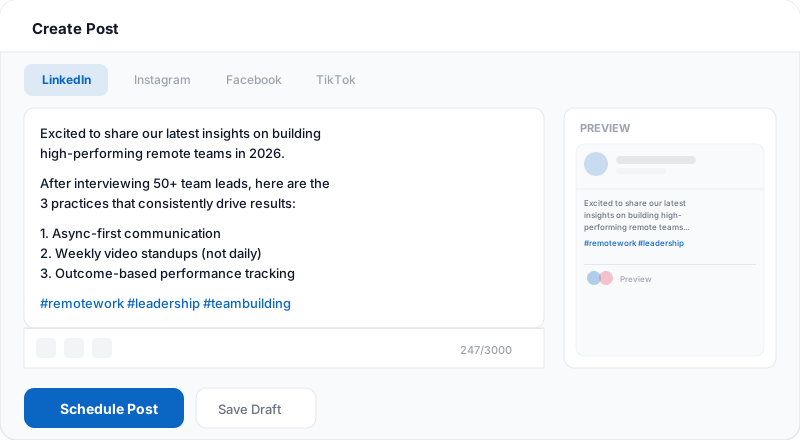
Create your post in Postger's composer. Write your caption, attach images or a document for a carousel post, and add any hashtags. If you are posting to multiple platforms, toggle per-platform tabs to customize the copy for LinkedIn's professional audience while keeping a different version for Instagram or TikTok.
Pick a date and time on the content calendar, or use Postger's best-time-to-post suggestions based on your audience's engagement patterns. Click Schedule, and the post publishes automatically at the chosen time. You can also add it to a smart queue that fills your recurring time slots automatically.
After your post is published, track its performance in Postger's analytics dashboard. See impressions, engagement rate, clicks, and follower growth for every LinkedIn post alongside your other platforms. Use these insights to refine what you post and when.
Plan your LinkedIn content with a visual calendar
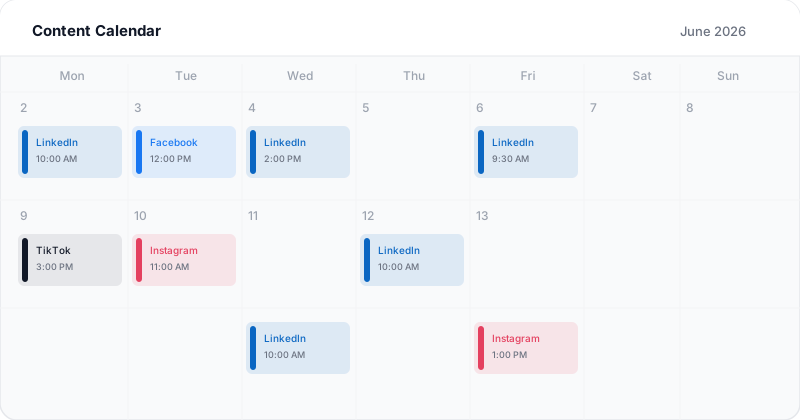
Postger's content calendar is where you see your entire LinkedIn schedule at a glance. Every scheduled post appears on a month, week, or day view with color-coded cards showing which platform each post targets. LinkedIn posts show up in blue, Instagram in pink, Facebook in darker blue, and so on.
You can drag and drop posts to reschedule them to a different day or time slot. If you realize you have three LinkedIn posts on Monday and nothing on Wednesday, just drag one over. The calendar updates instantly and the post publishes at the new time.
For teams, the calendar also shows post statuses. You can see which posts are still drafts, which are pending approval, which are approved and scheduled, and which have already been published. This gives everyone a clear picture of the content pipeline without having to ask around.
The calendar works across all your connected platforms. So you are not just seeing your LinkedIn schedule in isolation. You see LinkedIn next to Instagram, Facebook, TikTok, and everything else, which helps you maintain a balanced publishing cadence across all your channels.
LinkedIn content types you can schedule
Postger supports every LinkedIn post format available through the official API. Text posts are the simplest: write your caption, add hashtags, and schedule. These work well for thought leadership, quick tips, and engagement-driven questions.
Image posts let you attach a single photo or graphic to your caption. LinkedIn image posts typically get higher engagement than text-only posts because they stand out in the feed. You can upload images directly or pull them from Postger's shared media library.
Carousel posts (also called document posts on LinkedIn) are one of the highest-engagement formats on the platform. Upload a PDF where each page becomes a swipeable slide. Carousels work especially well for step-by-step guides, listicles, and educational content. Postger handles the PDF upload and publishes the carousel automatically at your scheduled time.
Video posts let you share pre-recorded video content on LinkedIn. Upload your video file, write a caption, and schedule it. LinkedIn's algorithm tends to favor native video (uploaded directly) over external links, so scheduling video through Postger gives you the native format advantage. If you also create short-form video for TikTok or Instagram Reels, you can schedule both from the same dashboard.
You can also schedule link posts where your caption includes a URL and LinkedIn auto-generates a preview card. This is useful for driving traffic to blog posts, landing pages, or product announcements.
Related guides
When is the best time to post on LinkedIn?
The best posting time depends on your specific audience, but there are some general patterns. LinkedIn is a professional network, so engagement peaks during business hours. Most studies show that Tuesday through Thursday between 8 AM and 11 AM tends to perform well, with a secondary peak around lunchtime (12 PM to 1 PM).
Monday tends to be lower because people are catching up on emails and tasks. Friday engagement drops off in the afternoon as people wind down for the weekend. Weekends see significantly less activity overall, though there are exceptions depending on your industry.
Rather than relying on generic benchmarks, Postger analyzes your specific account's engagement data and suggests optimal posting windows. These suggestions are based on when your followers are actually online and interacting, not industry averages. As your audience grows and changes, the recommendations update automatically.
Smart queues make this even easier. Define your preferred posting slots (for example, every Tuesday at 9 AM and Thursday at 10 AM) and Postger fills them automatically with content from your queue. You focus on creating thought leadership and industry insights, and the scheduler handles the timing.
Postger vs LinkedIn native scheduling
LinkedIn added native scheduling in 2023, letting you pick a date and time when creating a post. It works for basic use cases: if you are a solo creator scheduling one post at a time on LinkedIn only, native scheduling gets the job done for free.
Where native scheduling falls short is everything around the post. There is no visual calendar to see your upcoming LinkedIn content at a glance. There is no way to drag posts between time slots. There are no team approval workflows, no bulk scheduling, and no way to coordinate LinkedIn posts with your Instagram, TikTok, or Facebook schedule.
Postger fills those gaps. You get a visual calendar that shows all your scheduled LinkedIn posts alongside every other platform. Your team can review and approve content before it publishes. You can schedule carousels, set up recurring time slots, and manage multiple LinkedIn accounts from one place. The comparison table below covers all the differences.
Track LinkedIn performance with analytics
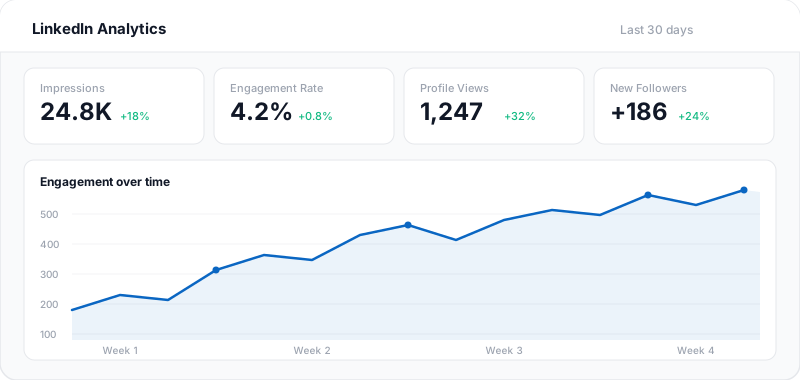
Scheduling is only half the job. The other half is understanding what works. Postger's analytics dashboard shows engagement metrics for every LinkedIn post: impressions, likes, comments, shares, clicks, and engagement rate. You can see these numbers right next to your other platforms so you can compare performance across channels.
Over time, analytics reveal patterns. You might discover that your carousel posts consistently outperform text posts, or that posts published on Tuesday morning get 40% more impressions than Thursday afternoon. These insights let you double down on what works and stop wasting time on what does not.
For agencies managing LinkedIn accounts, Postger generates unified reports covering impressions, follower growth, and engagement trends. Share them with clients directly instead of stitching together screenshots from LinkedIn's native analytics page.
LinkedIn scheduling for teams and agencies
When multiple people are involved in creating LinkedIn content, you need a process. Postger lets you set up approval workflows so that posts go through the right people before they are published. A content writer creates the draft, a team lead checks the messaging, and a client or compliance officer gives the final sign-off.
For agencies, Postger includes a branded client portal. Your clients can see their pending LinkedIn posts, leave comments, request edits, and approve content without needing their own Postger account. All the feedback lives right next to the post it refers to, so nothing gets lost in email threads.
Workspaces keep LinkedIn accounts separated by client. Each workspace has its own calendar, media library, and analytics, so there is no risk of publishing a post to the wrong company page. Switch between client workspaces from the sidebar with one click.
Pricing is flat. The Agency plan at $41/month includes unlimited users, workspaces, and social profiles. Whether you manage 3 LinkedIn accounts or 30, the price stays the same. There are no per-seat fees and no per-channel charges.
Key LinkedIn scheduling features
Personal profiles & company pages
Schedule posts to your personal LinkedIn profile or any company page you manage from one dashboard.
LinkedIn carousels
Create and schedule carousel (document) posts that drive engagement. Upload PDFs or multi-page documents directly.
Team approval workflows
Route LinkedIn posts through your team or client for review before they go live. No content publishes without sign-off.
Visual content calendar
See your entire LinkedIn posting schedule at a glance. Drag and drop to reschedule, set recurring time slots.
Best time to post
Postger analyzes your audience engagement patterns and suggests optimal posting windows for LinkedIn.
Cross-platform scheduling
Write once and publish to LinkedIn, Instagram, Facebook, TikTok, and more. Customize copy per platform.
Hashtag suggestions
Get relevant hashtag recommendations based on your post content and LinkedIn trending topics. Increase discoverability without manual research.
Media library
Store and organize your images, PDFs, and videos in a shared media library. Reuse assets across posts without re-uploading.
Postger vs LinkedIn native scheduling
| Feature | Postger | |
|---|---|---|
| Schedule posts in advance | ||
| Visual content calendar | - | |
| Multi-platform scheduling | 10+ platforms | LinkedIn only |
| Team approval workflows | - | |
| Carousel/document scheduling | ||
| Bulk scheduling | - | |
| Recurring time slots | - | |
| Cross-platform analytics | LinkedIn only | |
| Client portal for review | - | |
| Idea board / content pipeline | - | |
| Media library | - | |
| Smart queues | - |
Frequently asked questions
Can you schedule LinkedIn posts for free?
LinkedIn offers basic native scheduling for free, but it only works for LinkedIn and lacks a content calendar, team approvals, or bulk scheduling. Postger offers a 7-day free trial that lets you schedule LinkedIn posts alongside 10+ other platforms, with team approvals, a visual calendar, and smart queues included.
Does scheduling LinkedIn posts hurt my reach?
No. Postger publishes through LinkedIn's official API, so your post appears exactly as if you published it natively from the LinkedIn app. LinkedIn does not penalize posts that come through authorized third-party tools. In fact, scheduling often improves reach because you can consistently post at the times when your audience is most active.
Can I schedule LinkedIn carousel (document) posts?
Yes. Postger fully supports LinkedIn carousel posts. Upload a PDF or multi-page document, write your caption and hashtags, and schedule it for the optimal time. The carousel publishes automatically with full swipe-through functionality, just like posting natively.
Can I schedule to both personal profiles and company pages?
Yes. You can connect both your personal LinkedIn profile and any company pages you manage. Each appears as a separate account in Postger, and you can schedule posts to any combination from the same composer.
What is the best time to post on LinkedIn?
The best time depends on your specific audience. General benchmarks suggest Tuesday through Thursday between 8 AM and 10 AM in your audience's timezone, but your results may vary. Postger analyzes your account's engagement patterns and suggests personalized optimal posting windows based on when your followers are most active.
How many LinkedIn posts should I schedule per week?
Most LinkedIn experts recommend posting 3 to 5 times per week for personal profiles and 2 to 4 times per week for company pages. Consistency matters more than volume. With Postger's smart queues, you can set recurring time slots (for example, every Tuesday and Thursday at 10 AM) and the scheduler fills them automatically as you add content to the queue.
Can my team review LinkedIn posts before they go live?
Yes. Postger includes approval workflows where posts go through one or more reviewers before they are published. A content creator writes the draft, a team lead or client reviews it, and nothing goes live without the required sign-offs. This is especially useful for agencies and brands with compliance requirements.
Is it safe to connect my LinkedIn account to Postger?
Yes. Postger connects through LinkedIn's official OAuth flow. You authorize Postger directly on LinkedIn's website, and your password is never shared with or stored by Postger. You can revoke access at any time from your LinkedIn account settings.
Can I schedule the same post to LinkedIn and other platforms?
Yes. When creating a post in Postger, you can select multiple platforms and customize the caption, hashtags, and media for each one. Your LinkedIn version can be longer and more professional while your Instagram or TikTok version stays short and casual. Everything publishes from one scheduler.
Ready to schedule your LinkedIn posts?
Start your 7-day free trial. No credit card required.
$0.00 due today, cancel anytime
Schedule posts on other platforms
Schedule posts, Reels, and multi-image content to Facebook Pages and Groups.
TikTok
Upload, schedule, and auto-publish TikTok videos alongside your other platforms.
Threads
Schedule and auto-publish Threads posts alongside your Instagram and other platforms.
Schedule pins to specific boards and manage your Pinterest content from one calendar.
Schedule feed posts, Reels, Stories, and carousels to your Instagram accounts.