Schedule Instagram Posts with Postger
Plan and auto-publish Instagram feed posts, Reels, Stories, and carousels from a visual content calendar. Manage your Instagram alongside LinkedIn, Facebook, TikTok, and more, with team approvals and analytics built in.
Why schedule Instagram posts?
Instagram's algorithm favors accounts that post consistently. Scheduling lets you maintain a regular cadence without being tied to your phone at specific times every day. You can plan your feed, Reels, and Stories in advance, schedule them for optimal engagement times, and focus on creating quality content instead of worrying about when to publish.
Scheduling is especially valuable for carousel posts and Reels, which take more effort to create. When you invest time in a 10-image carousel or an edited Reel, you want it to go out at the perfect time. A scheduler ensures your best content reaches your audience when they are most active.
For teams and agencies, scheduling Instagram content is essential. Multiple people may be involved in creating, reviewing, and approving posts. An Instagram scheduler with approval workflows ensures the right people see and approve content before it goes live, eliminating the risk of off-brand posts reaching your audience.
Batch creation is another benefit. Instead of scrambling for content every day, you can set aside time once or twice a week to plan and create posts for the entire week. Upload your images, write captions, add hashtags, and schedule everything in one focused session using a social media scheduler. Then step away and let the scheduler handle the rest.
How to schedule Instagram posts with Postger
Connect your Instagram Business or Creator account through the Social Accounts section. Postger uses Instagram's official Graph API, which provides full support for feed posts, carousels, Reels, and Stories. The connection takes under a minute.
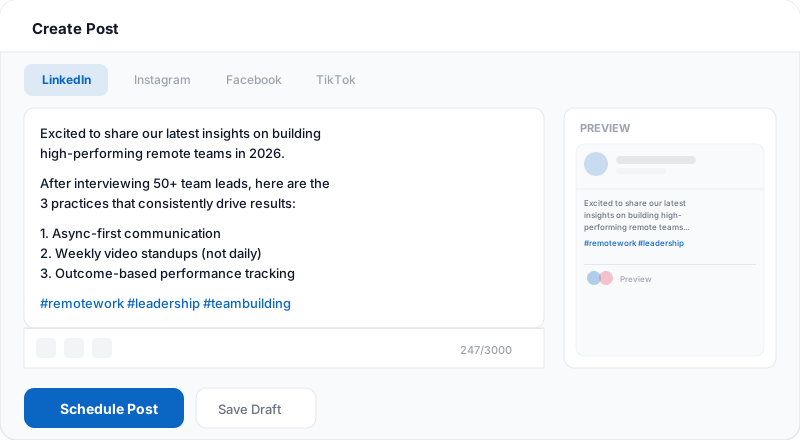
Create your content in the composer. Write your caption, attach images or video, add hashtags, and tag accounts. For carousels, upload up to 10 images in the order you want them to appear. If you are posting to other platforms too, toggle per-platform tabs to customize the copy and media for each network.
Select a date and time on the visual calendar or use Postger's smart queue to auto-fill your best posting times. Click Schedule, and the post publishes automatically. No push notification, no manual tap required.
After publishing, track your post's performance in Postger's analytics. See reach, impressions, likes, comments, saves, and engagement rate for every post alongside your other platform metrics.
Supported content types: feed posts, Reels, Stories, and carousels
Instagram offers several content formats, and each serves a different purpose in your strategy. Postger supports scheduling all of them so you can plan your entire Instagram presence from one tool.
Feed posts are the foundation. Single-image or single-video posts that live permanently on your profile grid. They are best for polished content, announcements, product showcases, and evergreen tips. Schedule them with captions, hashtags, and location tags.
Carousels let you share up to 10 images or videos in a swipeable format. They are among the highest-engagement formats on Instagram because users spend more time swiping through slides. Use carousels for tutorials, before-and-after comparisons, listicles, and storytelling. Postger lets you upload all images, arrange the order, and schedule the carousel for any future time.
Reels are short-form vertical videos (up to 90 seconds). Instagram's algorithm heavily promotes Reels, making them one of the best ways to reach new audiences beyond your followers. Schedule your edited Reels with captions, hashtags, and cover images. You can repurpose the same vertical video as a TikTok or Facebook Reel from the same composer.
Stories are ephemeral content that disappears after 24 hours. They are ideal for behind-the-scenes updates, polls, quick announcements, and casual engagement. Postger can schedule Stories so you maintain a consistent daily presence in the Stories tray without manual posting.
Plan your Instagram feed on a visual calendar
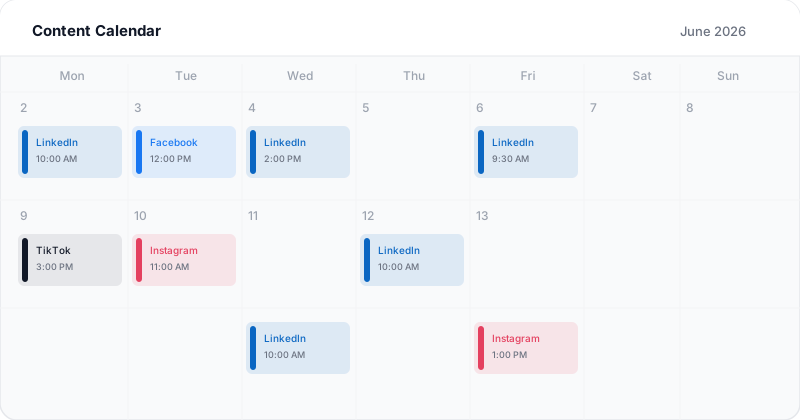
Postger's content calendar shows all your scheduled Instagram posts alongside your other platforms. Each post appears as a color-coded card with a thumbnail preview, the first line of the caption, and the scheduled time.
You can switch between month, week, and day views to get the level of detail you need. The month view gives you a high-level picture of your content distribution. The week view shows daily cadence and timing. The day view lets you fine-tune the order and spacing of posts within a single day.
Drag and drop posts to reschedule them. If a post needs to move from Tuesday to Thursday, just drag it. The scheduled time updates automatically. This makes it easy to adjust your plan when priorities change or when you need to make room for timely content.
For Instagram specifically, the calendar helps you visualize your feed grid. You can see what images will appear next to each other and adjust the order so your grid looks cohesive and visually appealing when someone visits your profile.
Related guides
When is the best time to post on Instagram?
Instagram engagement varies by audience, niche, and geography, but general patterns are consistent across most accounts. Weekday mornings between 9 AM and 11 AM tend to see high engagement as people check their phones during commutes and work breaks. Evenings between 7 PM and 9 PM are another strong window when people relax and scroll.
Lunchtime (12 PM to 1 PM) is another reliable window, especially for B2C brands. Weekends can be hit or miss depending on your audience. Lifestyle, travel, and food content often performs well on Saturday and Sunday mornings, while B2B content tends to underperform on weekends.
Rather than relying on generic best-time advice, use Postger's analytics to find the posting times that work best for your specific audience. Over time, you will see patterns in when your posts get the most reach, likes, and comments. Smart queues let you define your optimal posting windows once, and Postger fills them automatically as you add content to the queue.
Postger vs Meta Business Suite for Instagram scheduling
Meta Business Suite is Instagram's free scheduling tool, and it handles the basics well. You can schedule feed posts, Reels, and Stories to your Instagram and Facebook accounts. The calendar view shows your upcoming content, and posts publish automatically at the scheduled time.
Where Meta Business Suite falls short is beyond Instagram and Facebook. If you also manage LinkedIn, TikTok, Pinterest, Threads, or YouTube, you need a separate tool. Your content calendar is fragmented across multiple dashboards, and there is no unified view of your entire social strategy.
Postger unifies everything. Schedule Instagram content alongside 10+ other platforms on one visual calendar. Route posts through team approval workflows. Give clients a branded portal to review and approve content. Manage multiple brands in isolated workspaces. See cross-platform analytics in one dashboard. For teams that manage more than just Instagram and Facebook, the consolidated workflow saves significant time every week.
Track Instagram performance with analytics
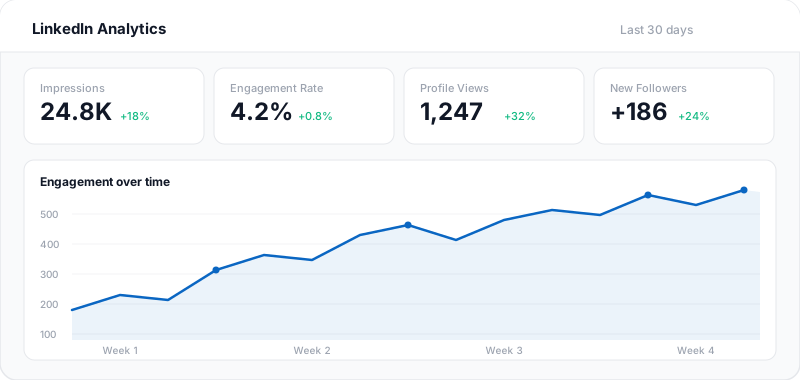
Postger's analytics dashboard gives you a clear view of how your Instagram content is performing. For every post, you can see reach, impressions, likes, comments, saves, shares, and engagement rate. Over time, these metrics reveal which content types, topics, and posting times deliver the best results.
Compare Instagram performance against your other platforms. Maybe your audience engages more with LinkedIn text posts than Instagram carousels, or maybe your Reels outperform everything else. Cross-platform analytics help you allocate your content creation effort where it matters most.
Agencies working with multiple Instagram accounts can build client-ready reports that combine feed post metrics, Reel performance, and Story engagement with data from LinkedIn, Facebook, and other channels. Clients receive a single performance snapshot instead of fragmented platform-by-platform updates.
Instagram scheduling for teams and agencies
Managing Instagram for multiple clients or a large brand requires coordination. Postger's team features make this straightforward. Set up approval workflows so every Instagram post goes through the right reviewers before it publishes. Add internal notes and feedback directly next to the post.
Agencies can use the branded client portal to let clients review and approve Instagram content without needing a Postger account. Clients see the post preview, leave comments, and approve or request changes. All feedback is tracked in one place.
Each client or brand gets its own workspace with separate social accounts, team members, and content calendars. This keeps content isolated and prevents accidental cross-posting between clients. The Agency plan at $41/month includes unlimited users, workspaces, and social profiles with no per-seat fees.
Key Instagram scheduling features
Feed posts, Reels & Stories
Schedule all Instagram content types: single-image feed posts, multi-image carousels, Reels, and Stories.
Carousel scheduling
Create and schedule carousel posts with up to 10 images. Postger handles the upload and publishes on time.
Auto-publishing
Posts publish automatically through Instagram's API. No push notification to tap, no manual step required.
Team approval workflows
Route Instagram posts through reviewers before publishing. Clients approve via a branded portal.
Visual content calendar
See your entire Instagram schedule on a drag-and-drop calendar with month, week, and day views.
Hashtag management
Save hashtag groups and apply them to posts quickly. Test different hashtag strategies and track performance.
Cross-platform scheduling
Schedule Instagram content alongside LinkedIn, Facebook, TikTok, Pinterest, Threads, and more from one dashboard.
Instagram analytics
Track reach, impressions, engagement rate, and follower growth for every post alongside your other platforms.
Postger vs Meta Business Suite native scheduling
| Feature | Postger | Meta Business Suite |
|---|---|---|
| Schedule posts in advance | ||
| Visual content calendar | ||
| Multi-platform scheduling | 10+ platforms | Instagram + Facebook |
| Carousel scheduling | ||
| Reel scheduling | ||
| Story scheduling | ||
| Team approval workflows | Basic | |
| Client portal for review | - | |
| Bulk scheduling | - | |
| Idea board / content pipeline | - | |
| Cross-platform analytics | Instagram + Facebook | |
| Recurring time slots | - |
Frequently asked questions
How do I schedule Instagram posts?
Connect your Instagram Business or Creator account to Postger. Create your post in the composer, attach images or video, write your caption and hashtags, and pick a date and time on the content calendar. Postger auto-publishes at the scheduled time through Instagram's official API.
What is the best Instagram scheduling tool?
Postger is the best Instagram scheduler for teams and agencies. It supports feed posts, Reels, Stories, and carousels, with team approval workflows, a client portal, and cross-platform scheduling to 10+ platforms. Plans start at $17/month with no per-seat fees.
Can you schedule Instagram Reels?
Yes. Postger supports scheduling Instagram Reels alongside feed posts, Stories, and carousels. Upload your video, write a caption, add hashtags, and schedule it on the content calendar. Reels publish automatically through Instagram's API at the scheduled time.
Can you schedule Instagram carousel posts?
Yes. Postger lets you create carousel posts with up to 10 images, write a caption, and schedule them for any future date and time. The carousel publishes automatically through Instagram's API.
Does scheduling Instagram posts hurt reach?
No. Postger publishes through Instagram's official Graph API, so your post appears exactly as if you published it natively from the Instagram app. Instagram does not penalize content from authorized third-party tools. Consistent posting through a scheduler often improves reach because the algorithm favors accounts with regular activity.
Can I schedule Instagram Stories?
Yes. Postger supports scheduling Instagram Stories. Upload your image or short video, and Postger publishes the Story automatically at the scheduled time through the official API. No manual step or push notification needed.
Can I customize posts for Instagram and other platforms at the same time?
Yes. When creating a post in Postger's composer, you can toggle on multiple platforms and switch between per-platform tabs to customize the caption, hashtags, and media for each network. This lets you adapt the tone and format for Instagram's visual audience while keeping LinkedIn professional or TikTok casual, all from one session.
What is the best time to post on Instagram?
Instagram engagement tends to peak during weekday mornings (9 AM to 11 AM) and evenings (7 PM to 9 PM), though optimal times vary by audience and niche. Postger's analytics help you identify when your specific followers are most active so you can schedule posts for maximum reach.
How much does an Instagram scheduler cost?
Postger plans start at $17/month (billed yearly) with a 7-day free trial. Instagram scheduling is included on all plans alongside 10+ other platforms. The Agency plan at $41/month includes unlimited users, workspaces, and social profiles with no per-seat fees.
Ready to schedule your Instagram posts?
Start your 7-day free trial. No credit card required.
$0.00 due today, cancel anytime
Schedule posts on other platforms
Schedule posts, carousels, and articles to your LinkedIn profile and company pages.
Schedule posts, Reels, and multi-image content to Facebook Pages and Groups.
TikTok
Upload, schedule, and auto-publish TikTok videos alongside your other platforms.
Threads
Schedule and auto-publish Threads posts alongside your Instagram and other platforms.
Schedule pins to specific boards and manage your Pinterest content from one calendar.