Schedule Facebook Posts with Postger
Plan and auto-publish Facebook posts from a visual content calendar. Schedule to Pages and Groups, manage Reels and multi-image posts, and coordinate with your other social platforms from one dashboard.
Why schedule Facebook posts?
Facebook's algorithm prioritizes consistent posting. Pages that publish regularly see better organic reach than those that post sporadically. But manually publishing every day across multiple Pages, Groups, and formats is time-consuming, especially if you manage client accounts or post to other platforms as well.
Scheduling Facebook posts lets you plan your content in advance during a focused work session. You can create a full week of posts in one sitting, schedule them for optimal times, and move on to other work. The posts publish automatically without any manual intervention, even when you are offline.
For agencies, scheduling is critical. You might manage dozens of Facebook Pages across different clients. A scheduler like Postger lets you manage all of them from one dashboard, coordinate Facebook posts with Instagram, LinkedIn, and other platforms, and ensure every post goes through client approval before publishing.
There is also the consistency benefit. Most Facebook experts recommend posting at least once per day for Pages. Without scheduling, maintaining that cadence during busy weeks, holidays, or vacations becomes nearly impossible. With a scheduler, you can batch-create content and maintain your rhythm regardless of what else is happening.
How to schedule Facebook posts with Postger
Connect your Facebook Page to Postger through the Social Accounts section. Click Add Account, select Facebook, and authorize the connection. Postger uses Facebook's official Graph API, so you get full access to post types including text, images, multi-image albums, video, and Reels.
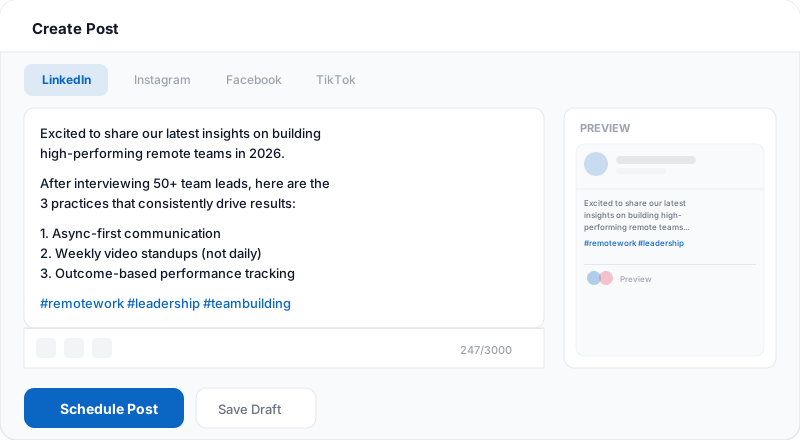
Create your post in the composer. Write your caption, attach media, and select your Facebook Page as the target. If you are publishing the same content to other platforms, toggle the per-platform tabs to adjust the copy, hashtags, and media for each network. Your Facebook version might include a link while your Instagram version focuses on the visual.
Choose a date and time on the visual calendar, or add the post to a smart queue that auto-fills your best time slots. Click Schedule. Postger publishes the post at the chosen time through Facebook's API. You can edit or reschedule the post at any time before it goes live.
After publishing, track performance in Postger's analytics dashboard. See reach, engagement, clicks, and reactions for every Facebook post alongside your other platforms. Use these insights to understand what content resonates with your Facebook audience.
Facebook content types you can schedule
Postger supports all major Facebook post formats available through the Graph API. Text posts are the simplest: write your status update, add any links, and schedule. Text posts with questions or opinions tend to drive comments and discussion.
Image posts let you attach a single photo or graphic. These stand out in the feed more than plain text and typically get higher engagement. You can upload images directly or pull them from Postger's shared media library.
Multi-image posts let you attach several photos to one post. Facebook displays them in a gallery layout that users can scroll through. This format works well for product showcases, event recaps, behind-the-scenes content, and before/after comparisons.
Video posts let you upload native video directly. Facebook's algorithm heavily favors native video over external links (like YouTube URLs), so scheduling video through Postger gives you the native advantage. Your video uploads directly to Facebook and plays inline in the feed.
Facebook Reels are short-form vertical videos, similar to Instagram Reels or TikTok. Postger lets you schedule Reels alongside your regular feed posts. Upload your video, write a caption, and schedule it. You can even repurpose the same video as an Instagram Reel or TikTok from the same composer.
Plan your Facebook content with a visual calendar
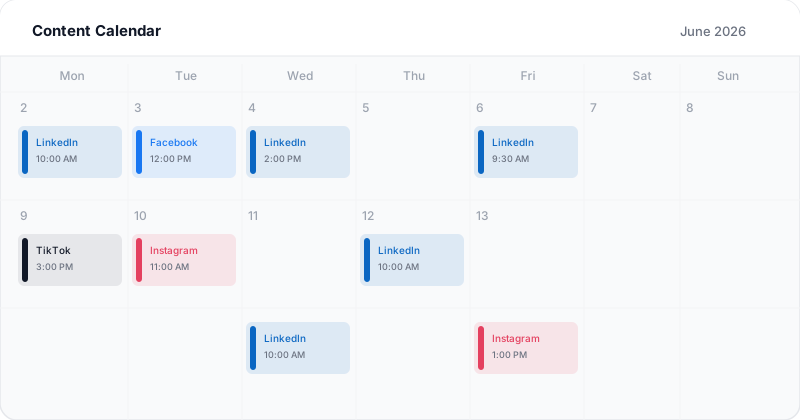
The content calendar is the central view in Postger. Every scheduled and published post appears on a month, week, or day view with color-coded cards. Facebook posts show up in blue, Instagram in pink, LinkedIn in a different shade of blue, TikTok in dark gray, and so on.
You can drag and drop posts to reschedule them. If you realize you have too many Facebook posts on Monday and nothing on Wednesday, just drag one over. The calendar updates instantly. This makes it easy to maintain a balanced publishing rhythm without manual date calculations.
For teams, the calendar shows post statuses: draft, pending approval, approved, scheduled, and published. Everyone on the team can see where each piece of content stands. Managers see the big picture, creators see their drafts, and clients see what is waiting for their sign-off.
The calendar is cross-platform, so you see your Facebook content alongside everything else. This prevents the common mistake of scheduling the same topic to Facebook and Instagram on the same day, or leaving a platform with no content for several days.
Related guides
When is the best time to post on Facebook?
The best posting time depends on your audience, but general research suggests that weekdays between 9 AM and 1 PM tend to perform well on Facebook. Wednesday and Friday often see slightly higher engagement. Weekends can work for consumer brands but tend to underperform for B2B content.
Morning posts (8 AM to 10 AM) catch people checking their phones before work. Lunchtime posts (12 PM to 1 PM) reach people during their break. Late afternoon posts (3 PM to 5 PM) can catch commuters, but engagement often drops after 6 PM.
Rather than following generic benchmarks, use Postger's best-time-to-post suggestions. These are based on your specific account's engagement data, not industry averages. The recommendations update as your audience grows and their behavior changes.
Smart queues simplify this further. Set your preferred posting slots and Postger fills them automatically as you add content to the queue. You define the rhythm once and the scheduler maintains it for you.
Postger vs Meta Business Suite
Meta Business Suite is Facebook's free built-in scheduling tool. It lets you schedule posts and Reels to Facebook Pages and Instagram accounts. For a solo business owner managing one Facebook Page and one Instagram account, Meta Business Suite handles the basics well and costs nothing.
The limitation is scope. Meta Business Suite only covers Facebook and Instagram. If you also publish to LinkedIn, TikTok, Pinterest, Threads, or YouTube, you need a separate tool for those platforms. You end up managing two or three dashboards instead of one, and there is no unified calendar showing your entire content schedule across all networks.
Meta Business Suite also lacks robust team workflows. It has basic role management, but no multi-step approval chains, no branded client portal, and no way for external reviewers to approve content without full platform access.
Postger brings everything into one place. You schedule Facebook posts alongside content for 10+ other platforms, all on the same visual calendar. Your team reviews and approves posts before they go live. Clients see a branded portal with pending content. And your analytics show performance across every platform, not just Facebook and Instagram. The comparison table below breaks down all the differences.
Track Facebook performance with analytics
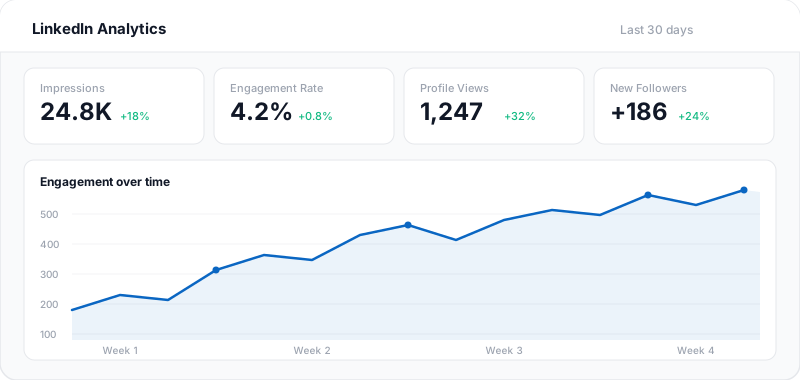
After your posts publish, Postger pulls engagement data from Facebook's API and displays it in a unified analytics dashboard. You can see reach, impressions, engagement (likes, comments, shares), link clicks, and video views for every post.
The cross-platform view lets you compare Facebook performance against your other channels. Maybe your video content does better on Facebook than Instagram, or your link posts drive more clicks from Facebook than LinkedIn. These comparisons help you allocate your content creation time to the platforms that deliver the best results.
Agencies can export performance summaries that combine Facebook Page metrics with data from every other connected platform. One document replaces the manual process of logging into Meta Business Suite, LinkedIn, TikTok, and other dashboards separately.
Facebook scheduling for teams and agencies
When multiple people create Facebook content, you need a review process. Postger lets you set up approval chains where posts go through the right people before publishing. A content creator writes the draft, a manager reviews the copy and visuals, and a client or stakeholder gives the final approval.
Agencies get a branded client portal. Your clients can view their pending Facebook posts, leave comments on specific content, request changes, and approve posts without needing their own Postger account. This replaces the back-and-forth over email and keeps all feedback attached to the post it refers to.
Every client gets a dedicated workspace with its own Facebook Pages, content queue, and performance data. Your team moves between client accounts from the sidebar without juggling logins. Cross-posting between clients is impossible because each workspace is sealed off.
Pricing is flat. Plans start at $17/month, and the Agency plan at $41/month includes unlimited users, workspaces, and connected social profiles. Whether you manage 5 Facebook Pages or 50, the price stays the same.
Key Facebook scheduling features
Facebook Pages & Groups
Schedule posts to any Facebook Page or Group you manage. Switch between accounts without logging in and out.
Reels scheduling
Upload and schedule Facebook Reels alongside your regular posts. Postger handles the video upload and publishes on time.
Multi-image posts
Attach multiple images to a single post. Facebook displays them in a gallery layout that drives higher engagement.
Team approvals
Route Facebook posts through a review workflow. Team leads or clients approve content before it goes live.
Visual content calendar
See all your Facebook posts on a drag-and-drop calendar with month, week, and day views.
Cross-platform publishing
Write once and publish to Facebook, Instagram, LinkedIn, TikTok, and more. Customize per platform.
Video scheduling
Upload and schedule native Facebook video posts. Native video gets prioritized in the feed over external links.
Media library
Store and organize images, videos, and graphics in a shared library. Reuse assets across posts without re-uploading every time.
Postger vs Meta Business Suite native scheduling
| Feature | Postger | Meta Business Suite |
|---|---|---|
| Schedule posts in advance | ||
| Visual content calendar | ||
| Multi-platform scheduling | 10+ platforms | Facebook + Instagram |
| Team approval workflows | Basic | |
| Reel scheduling | ||
| Bulk scheduling | - | |
| Recurring time slots | - | |
| Client portal for review | - | |
| Idea board / content pipeline | - | |
| Cross-platform analytics | Facebook + Instagram | |
| Media library | Basic | |
| Smart queues | - |
Frequently asked questions
How do I schedule a post on Facebook?
With Postger, connect your Facebook Page, create your post in the composer, attach images or video, and pick a date and time on the calendar. Postger publishes automatically at the scheduled time through Facebook's official API. You can also use Meta Business Suite's built-in scheduler, but it only covers Facebook and Instagram.
Can you schedule Facebook posts for free?
Meta Business Suite lets you schedule Facebook posts for free, but it only supports Facebook and Instagram. Postger offers a 7-day free trial with scheduling across 10+ platforms, team approvals, smart queues, and a visual content calendar.
Does scheduling Facebook posts hurt reach?
No. Postger publishes through Facebook's official Graph API, so your post appears exactly as if you published it natively. Facebook does not penalize posts from authorized third-party tools. Scheduling often improves reach because you can consistently post at the times your audience is most active.
Can you schedule Facebook Reels?
Yes. Postger supports scheduling Facebook Reels alongside regular feed posts. Upload your video, write a caption, and schedule it on the calendar. The Reel publishes automatically at the chosen time with full native formatting.
Can I schedule posts to Facebook Groups?
Yes. Postger lets you schedule posts to Facebook Groups you manage, in addition to Facebook Pages. Select the Group as your target in the composer, write your content, and schedule it like any other post.
What is the best time to post on Facebook?
General benchmarks suggest weekdays between 9 AM and 1 PM perform well, with Wednesday and Friday seeing slightly higher engagement. However, the best time depends on your specific audience. Postger analyzes your account's engagement patterns and suggests personalized optimal posting windows.
Can my team approve Facebook posts before publishing?
Yes. Postger includes approval workflows where posts go through one or more reviewers before publishing. A content creator writes the draft, a manager or client reviews it, and nothing goes live without the required sign-offs. Agencies can also use the branded client portal for external approvals.
How is Postger different from Meta Business Suite?
Meta Business Suite only covers Facebook and Instagram. Postger supports 10+ platforms from one dashboard, adds team approval workflows, client portals, smart queues, bulk scheduling, and unified cross-platform analytics. If you manage content beyond Facebook and Instagram, Postger replaces multiple tools with one.
Can I schedule the same post to Facebook and Instagram at once?
Yes. When creating a post in Postger, select both Facebook and Instagram as targets. You can customize the caption, hashtags, and media for each platform using per-platform tabs. Both posts schedule and publish independently at their chosen times.
Ready to schedule your Facebook posts?
Start your 7-day free trial. No credit card required.
$0.00 due today, cancel anytime
Schedule posts on other platforms
Schedule posts, carousels, and articles to your LinkedIn profile and company pages.
TikTok
Upload, schedule, and auto-publish TikTok videos alongside your other platforms.
Threads
Schedule and auto-publish Threads posts alongside your Instagram and other platforms.
Schedule pins to specific boards and manage your Pinterest content from one calendar.
Schedule feed posts, Reels, Stories, and carousels to your Instagram accounts.