ScreenWhite
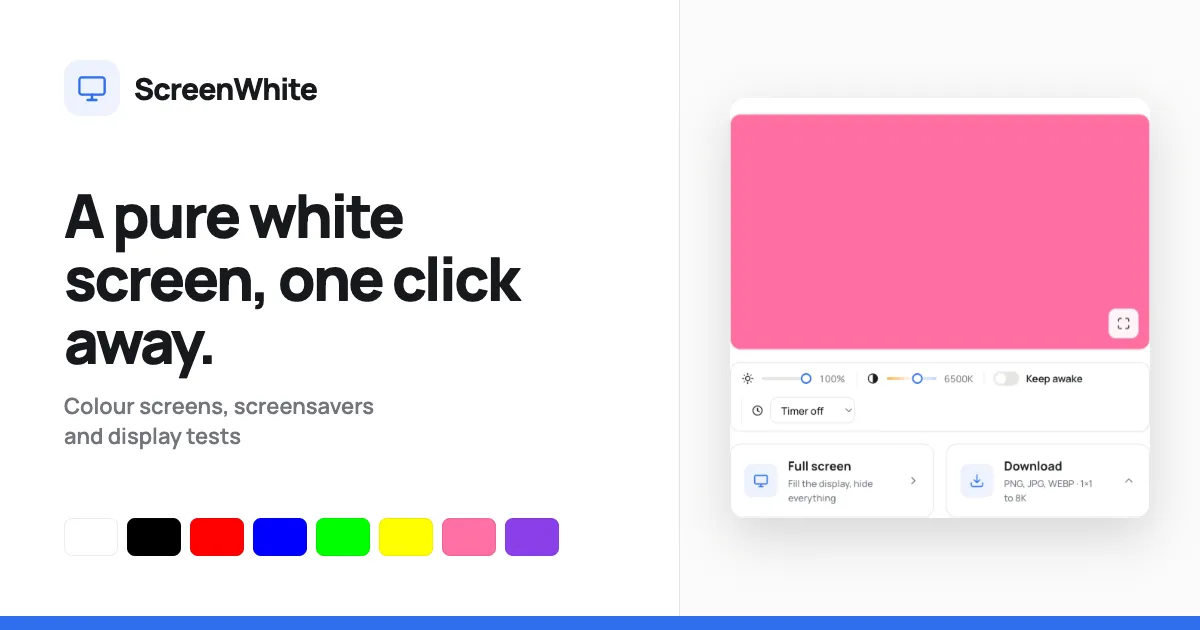
A free browser-based white screen generator with brightness and colour temperature sliders, a wake-lock timer, and direct PNG/JPG/WEBP downloads up to 8K resolution.
About ScreenWhite
Introduction
ScreenWhite is a compact web application that carries out a surprisingly specific task: it fills a monitor with a pristine, solid white field. Behind this simple premise lies a set of deliberate engineering choices. The page incorporates a full-screen mode, a brightness slider, a Kelvin-scale colour temperature control, an optional screen wake lock, and a download panel that generates plain white PNG, JPG, or WEBP files up to 7680 × 4320 pixels. There is no registration, no advertising pop-up, and no persistent storage. The tool serves anyone who needs an instant, even light source, a quick dead-pixel test, or a way to share exact colour references across devices. Because this is a pure web utility rather than a native app, it works on desktops, tablets, and even TV browsers with no installation.
Key Features
ScreenWhite deliberately limits its own footprint. The page avoids heavy JavaScript frameworks, uses a single stylesheet, and does not rely on external tracking scripts. This minimalist approach is not an accident but part of its performance plan. The resulting tool is quick, direct, and dependable. The most significant features are:
- Instant full-screen rendering — The solid colour is hardcoded as an inline style on the preview and fullscreen layers. The browser paints the correct colour in the very first frame, before the stylesheet or scripts finish loading. This means no visible white-to-black or black-to-white flicker when the page opens or when full-screen is activated.
- Brightness and colour-temperature controls — Two slider controls adjust the appearance of the white field. Brightness spans from 10 to 100 percent, while colour temperature runs from a warm 2000K to a cool 9000K. Unlike other tools that overlay a translucent filter, ScreenWhite recalculates the underlying RGB value. The result is always a true solid rectangle, which keeps the output accurate for technical evaluations.
- Screen Wake Lock API integration — The "Keep awake" checkbox requests a browser wake lock. This prevents the display from sleeping during extended sessions, an essential feature for light boxes or video calls that stretch over several hours. When the browser does not support the API, the toggle is disabled rather than ignored.
- Timer with useful presets — The timer control offers off, 1, 5, 10, 20, 30, and 60-minute intervals. After the countdown reaches zero, the page exits fullscreen automatically. This makes the white screen suitable for timed activities where unattended operation is needed.
- Download panel — Users can generate white images in PNG, JPG, or WEBP, in sizes from a single 1×1 pixel to 8K (7680×4320). The download interface also includes traditional benchmark sizes such as 1080p, 2K, 4K, 5K, and a mobile portrait option. A key detail: the PNG encoder is purpose-built and writes a one-bit palette file, which makes an 8K download only a few kilobytes.
- Direct image links — Static links like
/image/white-1920x1080.pngsupply pre-rendered white images. Developers can use these as placeholder assets or incorporate them into automated monitor-testing scripts.
- Custom colour URL route — The site supports paths such as
/screen/6495ED, turning any six-character hex value into a full-screen display of that exact colour. This is particularly useful for design teams that need to agree on a shade without exchanging annotated screenshots.
- A colour library and embed option — The full library of 24 named colour screens gives quick access to common shades such as black, cream, and teal. Additionally, an iframe snippet allows embedding a solid-colour screen into third-party websites, a valuable trick for testing page layouts or creating blank placeholder areas.
How It Works
The workflow is effortless. On arriving at the homepage, the browser displays a large rectangle that is initially pure white. The brightness slider then allows the user to reduce the brightness down to 10% for a soft grey-white that can be soothing in dark rooms. The colour-temperature slider can shift from a tungsten-like warm white to a daylight-style crispness. Both controls adjust the hex colour value itself, not just a CSS overlay. Once the settings are configured, a click on the "Full screen" button or pressing the F key enters a browser-wide fullscreen view. The colour appears behind all user-interface elements, and the display becomes a seamless white panel. Exiting is as simple as pressing Escape or using the small exit indicator.
For downloads, the user opens the download panel and chooses a format and size. The generated file is served either from the server's tiny one-bit PNG encoder or, for JPG and WEBP, rendered locally in the browser using canvas. The user saves the file to their device; no image is sent over the network when the download is JPG or WEBP. The whole experience is intentionally lightweight. The site contains only a few lines of client-side JavaScript to manage the sliders and a small service that outputs an image binary on request.
Because every screen colour and setting can be embedded in the URL, sharing a modified screen is straightforward. It is also possible to create a link to a dark shade, a saturated red, or any custom value by appending the hex code. Everything is deterministic; there is no state maintained on a server, hence there is nothing to log or store.
Use Cases
The tool's honesty about its purpose lends itself to several distinct practical scenarios:
- Video-call fill light — Remote workers can place a tablet or second monitor running ScreenWhite next to their webcam. This acts as a large, natural softbox that smooths facial shadows. The colour temperature control lets a user match the white to the ambient lighting, avoiding the blue tint of many laptop screens.
- Light table for paper tracing — Artists and drafts-persons use a white screen as a lightbox. A thin sheet of paper on a tablet screen becomes a translucent tracing surface. The brightness slider can be turned to maximum, and the wake-lock toggle ensures the screen remains active during long drawing sessions.
- Display inspection and repair — Repair shops and electronics testers use a solid white screen to reveal dead pixels, dust on the internal cover, or backlight uniformity problems. The tool is especially useful because it can fill several screen sizes without installing third-party diagnostic applications.
- Colour reference sharing — A graphic designer can send a client a link to a page that shows a particular brand colour full-screen. Both parties view the same hex value in a borderless, unobstructed context, which makes colour discussions far more reliable.
- Kiosk and digital signage — In museums or exhibition halls, the site can quickly put a display into a blank, bright state when a presentation has ended. The timer control prevents a screen from staying on indefinitely if it is forgotten.
- Web development placeholder — Developers working on responsive designs sometimes need an empty white block to test layout spacing. The iframe embed code lets them add a live, full-bleed white canvas directly into a page.
Pricing & Value
ScreenWhite is entirely free to use. No payment plan exists because there is no need for one: it has no server-side image processing beyond a simple PNG writer, and it hosts no user data. The footer promises "Free forever". For commercial users this is a blessing. Dedicated white-screen mobile apps often require a subscription or are cluttered with banner ads. ScreenWhite offers an open, unlimited alternative that can be used on every employee's computer and smartphone without a licence. The only costs are internet bandwidth and the knowledge that the service is provided as a single-page utility. The tool also has no official mobile app, but browsers on iOS and Android can run the page in fullscreen after adding it to the home screen. This approach gives the same value without a native installation.
Naturally, there are trade-offs. The tool's simplicity means no offline support unless users save the HTML file locally. It also lacks advanced features like gradient generation or the ability to schedule downloads. But for the narrow domain it targets, the value is excellent.
Final Verdict
ScreenWhite succeeds because it is elementary without lacking nuance. Every feature serves the goal of displaying a clean colour, and the implementation avoids the over-engineered bloat that plagues many browser-based utilities. The brightness and warmth control pair offer a genuine dimension that most similar tools overlook, and the download engine demonstrates that an 8K white image does not need to be huge. The tools section adds enough playful or practical companion utilities, such as fake OS updates and prank screens, to make the site a pleasant destination beyond its core function.
For the intended audience, ScreenWhite is close to perfect. It is fast, reliable, and unobtrusive. The most obvious limitation is the dependence on an internet connection. That caveat aside, the site is an excellent answer to a simple but recurring irritation: how to show a perfect, solid white background on any screen. The about page reveals that this is a personal project, which perhaps explains why the tool is so focused and free of the usual commercial clutter. Anyone who has ever wished for a quick white screen during a video call or a headless monitor test should add ScreenWhite to their bookmarks.
Pros
- The colour is rendered from an inline HTML style, so it paints in the first frame and avoids any flash of an unstyled background in fullscreen mode.
- The PNG download engine writes a one-bit palette file server-side, making an 8K white image only a few kilobytes large.
- Brightness and colour-temperature controls compute the actual RGB value rather than applying CSS filters, ensuring a genuine solid colour.
- The Screen Wake Lock API is integrated cleanly, and the option is disabled on unsupported browsers to prevent silent failure.
- An embeddable iframe snippet lets webmasters drop a solid white or custom-coloured screen into any page with a single line of code.
Cons
- The service requires an active internet connection and has no built-in offline mode or dedicated desktop application.
- iOS Safari restricts native Fullscreen API calls, so mobile users on Apple devices get a viewport-filling page instead of a true fullscreen experience.
- The download functionality is limited to solid colours; it cannot generate gradients, opacity variants, or other image patterns.