MySOP.guru
MySOP.guru is a Chrome extension that records workflows and generates polished Standard Operating Procedure PDFs with numbered callouts, using a pay-per-export model (€5/doc) with no subscription, ideal for teams that document occasionally.
About MySOP.guru
Introduction
Documenting business processes is one of those tasks that almost everyone postpones until it becomes urgent. MySOP.guru attacks this by removing the common obstacles: the need to write lengthy instructions, format screenshots, and pay monthly fees for tools that sit idle. This Chrome extension records a user's actions, captures screenshots, and generates a formatted PDF SOP document. The pricing model is refreshingly simple—the first export is free, and subsequent exports cost €5 each. This fits teams that produce documents a few times a year rather than daily. In this review, we look at the feature set, the workflow, and whether this pay-per-export approach actually delivers value.
Key Features
MySOP.guru packs several practical features that streamline the SOP creation process:
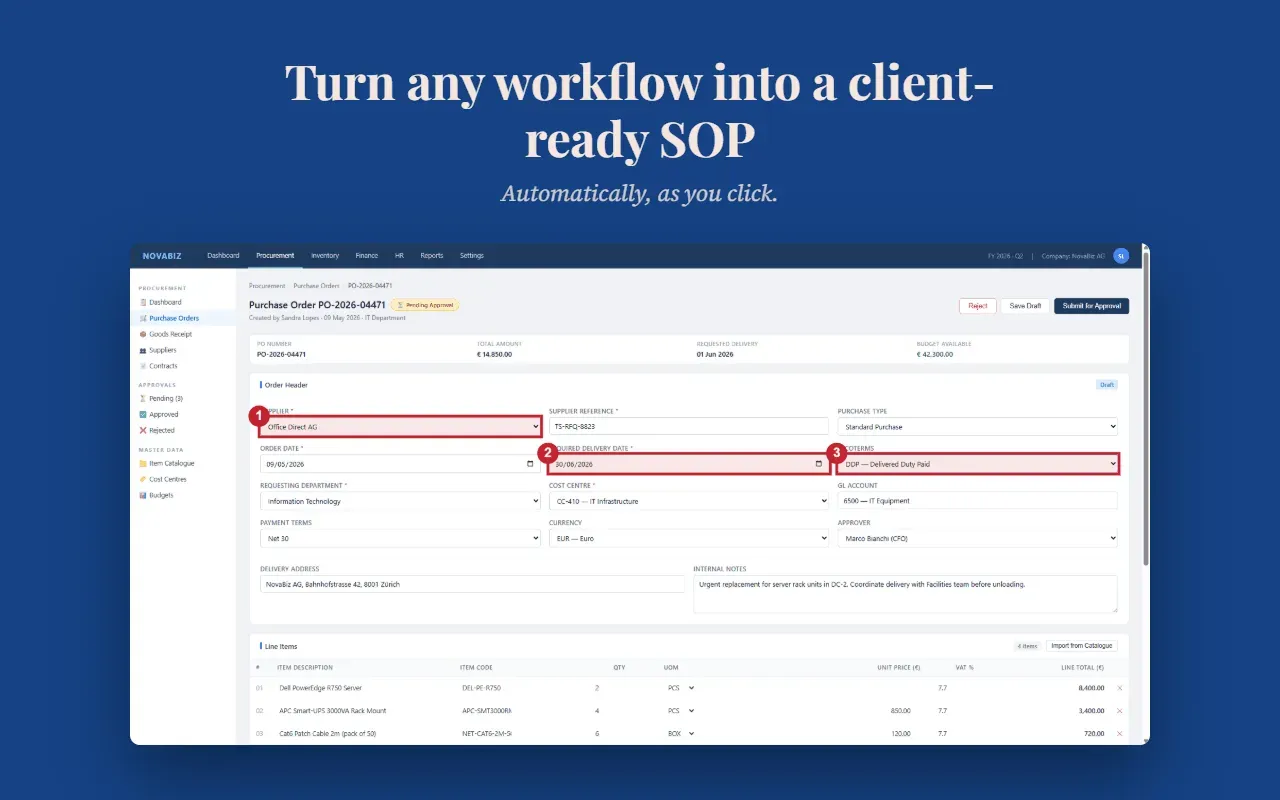
- Automatic Screenshot Capture: Every click, form entry, and page navigation during a recording session is captured. The extension takes a full-page screenshot and overlays a numbered badge on the element that was interacted with. This eliminates the need for manual screenshot tools, making the process almost effortless.
- Smart Page Grouping: Instead of creating a separate step for every action on a single screen, the tool groups multiple interactions from one page into a single step. This produces a concise SOP where related actions are listed as sub-steps, keeping the document readable and avoiding unnecessary page breaks.
- Drag-and-Drop Editor: After a capture, users can open the built-in editor to reorder steps, modify descriptions, add notes, or delete unwanted screenshots. The editor is responsive and gives full control before export, ensuring the final document is accurate.
- Professional PDF Export: Exporting generates a PDF with the user's logo, custom header and footer, page numbers, and a clean layout. The output resembles a professionally designed document, not a raw dump of screenshots. An HTML export option is also available for those who prefer a web-based format.
- Pay-Per-Export Pricing: The business model avoids recurring subscription fees. Users pay €5 for a PDF and €3 for HTML export. Bundles (10 docs for €40, 25 docs for €90) reduce the per-document cost, but there is no monthly commitment—during quiet months, the cost drops to zero.
- White-Label Branding: Users can upload their own logo, set fonts, adjust colors, and configure header and footer content. This makes the document look like it was produced by the user's organization, which is especially valuable for consultants and agencies delivering client-facing documentation.
- Free First Export: No credit card is required to start. The first PDF export is completely free, giving users a risk-free way to evaluate the output quality and determine if the tool fits their workflow.
How It Works
The user journey consists of four straightforward steps. First, the Chrome extension is installed from the Chrome Web Store. Once installed, clicking the toolbar icon starts a new capture session. The extension then records all interactions in the active tab—clicks, typing, navigation—until the user stops the recording. After stopping, the editor opens, displaying the captured steps. Each step includes a screenshot and a generated description based on the type of interaction. Users can freely edit these descriptions, split or merge steps, and drag them into the correct order. Finally, exporting generates a PDF or HTML file. The first export is free, and subsequent exports require payment through Stripe. The whole flow is designed to be simple enough for non-technical users, while still offering enough control to produce accurate, polished documents.
Use Cases
MySOP.guru serves a wide range of use cases where documentation is needed infrequently but with high quality:
- Human Resources: Onboarding a new employee often involves account creation, system access, and step-by-step procedures. Capturing the process during one onboarding session produces a reusable SOP that can be shared with every subsequent new hire.
- Finance: Month-end closing procedures, approval workflows, and audit trails benefit from clear documentation. The captured screenshots with callouts help ensure the process is followed correctly, especially when the original author is unavailable.
- Operations: When an employee leaves, the handover process can be stressful. MySOP.guru allows the departing employee to document the essential tasks quickly, preserving institutional knowledge without requiring days of manual writing.
- IT & Internal Systems: When a new CRM, approval system, or admin panel is rolled out, the IT team can capture the configuration steps and produce a guide for end-users. This is particularly useful for custom internal tools that lack ready-made documentation.
- Consultants & Agencies: Delivering branded SOP documents to clients is a common requirement. The white-label feature ensures that the document carries the consultant's logo and styling, enhancing the perceived quality of the deliverable.
- Small Teams: In any organization, there are processes that live only in one person's head. MySOP.guru provides a fast method to transfer that knowledge into a shareable document, especially for tasks that are done irregularly.
Pricing & Value
The pay-per-export model is the standout feature. Instead of paying $15–29 per seat per month for a documentation tool, users only pay €5 per PDF and €3 per HTML export. The first export is free, and capturing and editing are always free. This model is designed for teams that produce documentation occasionally. For example, if a team creates three SOPs in a year, the total cost would be €15 (excluding the free first one), whereas a subscription would cost over $100 annually. The credit bundles offer further savings: 10 documents for €40 (€4 each) and 25 for €90 (€3.60 each). Credits are valid for 24 months, which covers typical usage patterns. There is no storage fee, and exported documents are owned permanently. This pricing aligns with the reality that most teams don't document daily, making it a more economical choice than subscription-based alternatives.
Final Verdict
MySOP.guru is an effective tool that addresses a specific, often-overlooked need: producing professional SOPs without a heavy time investment or ongoing cost. The Chrome extension's simplicity is its greatest strength—anyone can capture a workflow in minutes and export a structured PDF that looks professionally designed. The pay-per-export pricing is a breath of fresh air in an era of subscription fatigue, and the free first export makes evaluation painless. The limitations are the lack of multi-application capture in one session and the dependence on Chrome, but these are minor for most typical use cases. For HR, finance, IT, and consulting teams that need to document processes on an occasional basis, MySOP.guru offers a compelling, cost-effective solution. For those who document constantly, a subscription might offer better value, but for the majority of small-to-medium teams, the per-document model is precisely right. Overall, it's a pragmatic and thoughtful product that deserves consideration.
Pros
- The pay-per-export model eliminates recurring subscription costs, making it highly affordable for teams that only occasionally need formal documentation.
- Automatic screenshot capture with numbered callouts drastically reduces the time spent on manual screenshot annotations and descriptive text.
- Smart page grouping consolidates multiple clicks on the same page into concise sub-steps, keeping SOPs readable and focused.
- White-label branding allows companies to export documents with their own logo, colors, and footer, ensuring a professional representation.
- The free first export and unlimited captures/edits provide a risk-free way to test the tool without any upfront investment.
Cons
- A single capture session cannot span multiple applications, which limits documenting cross-system workflows without creating separate SOPs.
- The tool is exclusively a Chrome extension, meaning Firefox or Safari users cannot directly use it without switching browsers.
- Per-document pricing may become less economical for very high documentation volumes, though the credit bundles help mitigate this.